In July 2026, a tech-community exposé racked up 955 points and 493 comments on Hacker News — a wave of users discovered that simply plugging an LG monitor into a Windows PC via HDMI causes the system to silently install, in the background, a piece of software called “LG Monitor App Installer.” No popup asking, no install progress bar, not even a record in Windows update history. Once installed, the software starts popping up a window at intervals promoting a 30-day free trial of McAfee antivirus.
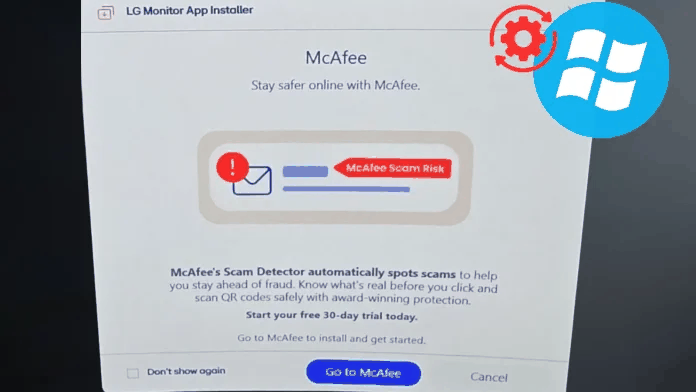 Figure: Windows Update, via the device metadata mechanism, automatically installs the app associated with an LG monitor onto the user’s system in the background. Source: Cyber Security News
If you’re thinking “it’s just a popup, uninstall it and you’re done” — it’s far from that simple.
Plug in, auto-install, zero consent, can’t be uninstalled normally
The well-known overseas hardware review channel GamersNexus, after receiving a flood of user complaints, bought a $1,200 LG UltraGear 34GX900A-B gaming monitor with its own money to verify. They connected it to several Windows 11 PCs, and every single one triggered the same behavior: plug in the HDMI cable, and within seconds Windows Update automatically pulled down and installed LG’s companion software. There was no confirmation step anywhere in the process.
More outrageous is the auto-start on boot. The software is set to launch with the system, and the permissions it requests in the Microsoft Store are the highest level — “all system resources” plus “internet access.” That means it can read your hardware configuration, location, online activity, even account credentials, and then send that data out over the network. GamersNexus ran 32 consecutive power cycles; the McAfee promo popup appeared 31 times.
And when you try to uninstall it, you’ll find there’s no uninstall button in the Microsoft Store at all. Ordinary users can only settle for removing it from the startup list under “Settings → Apps → Startup.” Fully disabling it requires opening the Group Policy Editor and modifying admin-level configuration related to device installation — and Windows Home edition users don’t even have that option.
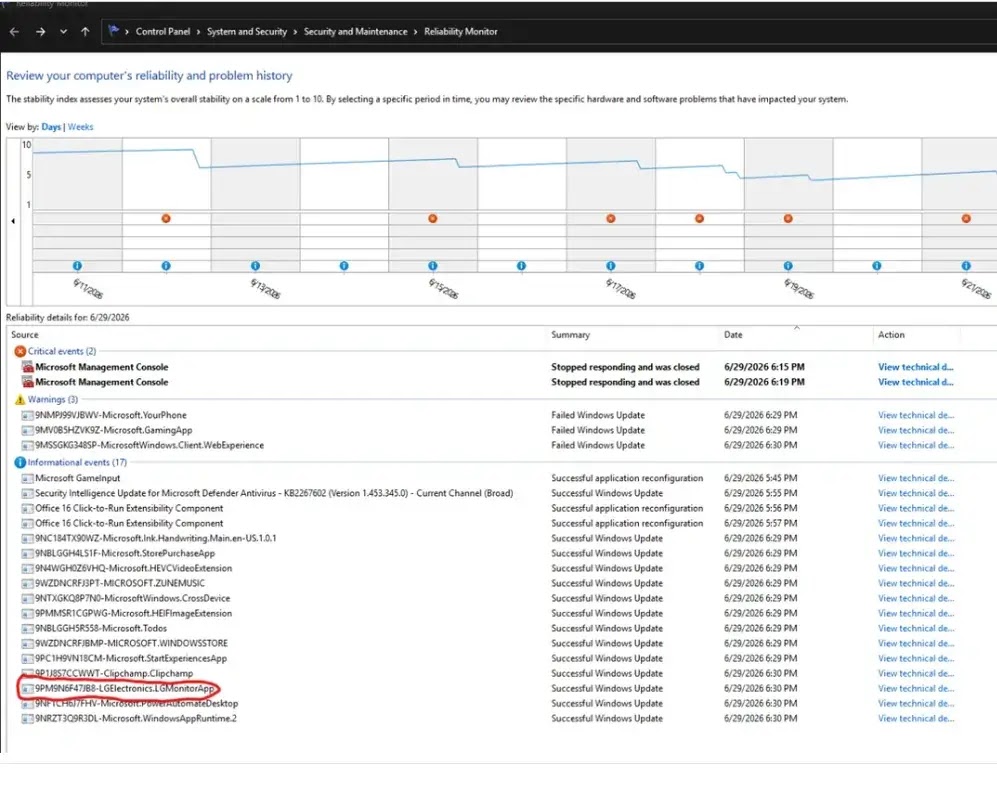 Figure: Through Windows Reliability Monitor (perfmon /rel), you can see that LG Monitor App Installer was successfully installed without the user’s knowledge. Source: Reddit user screenshot / Cyber Security News
Existing owners can’t escape either, and pro monitors are no exception
The thing that angered users most: it’s not just newly bought monitors that trigger it — LG monitors that have been in use for three years get hit too.
In testing, GamersNexus found that an LG UltraFine 32UN880-B professional monitor bought three years earlier also triggered the software installation when plugged in. The reason is that LG, via a firmware update, folded the older model into this “auto-install software” device list. The user did nothing — didn’t manually update firmware, didn’t click any consent button — and one day after powering on, there was an ad-promotion program in their PC that they couldn’t shake.
A highly upvoted comment on Hacker News summed up the severity:
- Your operating system installs software from a third-party vendor in the background, with zero user interaction
- Anyone with physical access can trigger it just by plugging a device into the HDMI port
- This software has internet and full-system access, with no sandbox isolation
- It runs on every system boot
- Plugging in a new monitor installs it, and a monitor already plugged in installs it too
- Even “professional-grade” LG monitors are affected
The commenter closed with: “I’m not aware of any precedent for this.”
Another user’s reaction was more blunt: “Is this even legal? Isn’t this just malware? Isn’t installing malware on someone else’s computer without permission illegal? Or is it actually illegal but nobody cares anymore?”
Windows Update is like a building’s access gate — but LG got a master key
To understand why this can happen, you first need to know about an underlying design in Windows.
Windows has a component called the “Device Metadata Retrieval Client.” Its intent is good: when you plug in a new piece of hardware — a printer, a mouse, or a monitor — Windows automatically downloads that device’s “identity information” (metadata) from Microsoft’s servers, including the device icon, name, and officially recommended companion software. Windows then automatically downloads and installs that companion software from the Microsoft Store.
The whole process happens entirely in the background. Microsoft’s official documentation states plainly: “The automatic installation feature does not provide notification to the user.”
This mechanism was originally designed for legitimate uses — a monitor maker could push a screen color-calibration tool, a printer maker could push a driver management program. But the problem is that no one audits what actually passes through this pipe. Microsoft designed this access-gate system, handed the access cards to every hardware vendor, and then never checks who’s using the card for what.
What LG did is simple: it associated a Microsoft Store program with the device metadata of its own monitors. The program is named “LG Monitor App Installer,” its description looks like a monitor management tool, but its actual behavior is popping up windows promoting a McAfee antivirus subscription — and McAfee clearly paid LG a promotion fee for this. So the monitor you paid thousands for becomes a billboard LG planted inside your computer.
 Figure: The monitor a user bought becomes a channel for the vendor to push ads, with Windows’ device metadata mechanism used as the distribution pipe. Source: Byteiota
Not just LG — Dell, Razer, and Asus are doing it too
In the Hacker News discussion, multiple users pointed out this is by no means an LG “innovation.”
Some mentioned that Dell’s Alienware monitors use the exact same mechanism, automatically pushing Alienware Command Center when an Alienware monitor or peripheral is detected. Others shared even older experiences — plugging in a Razer mouse, and the system immediately started downloading a 1.5GB software package containing “telemetry” that streamed data from the gaming PC in real time.
Another user recalled: “Since the Windows Vista or Windows 7 era, printer, mouse, tablet, and graphics-tablet makers have been using this method to slip in their junk software.”
Asus motherboards’ Armory Crate software is also auto-installed through a similar route. After the user flips a switch in the BIOS, Windows installs the whole control-software suite for you in the background — you don’t even need to download it manually.
In other words, this is already a mature “business model”: after selling you the hardware, hardware vendors use Windows’ driver distribution channel to install additional software on your PC, then use that software to either collect data, push ads, or promote paid third-party services. And the only thing you can do is, after the problem has already happened, go change a system setting that most ordinary users have no idea how to find.
Microsoft has a kill switch, but hasn’t pressed it in over a decade
In the discussion, one user pointed out a crucial detail: Microsoft has always held an “emergency brake” mechanism.
The intent of this mechanism is: if a hardware vendor’s driver has a serious bug that could crash the system or open a security hole, Microsoft can temporarily remove that vendor from the Windows Update driver distribution list to protect users. But in over a decade, Microsoft has never used this mechanism to stop any vendor from pushing adware or bloatware.
One Hacker News user wrote: “Microsoft could absolutely set up a set of rules for drivers, mandate that any vendor who violates them can only ship open-source drivers, or even kick them off the driver distribution list entirely — which would quickly kill a consumer hardware brand. But they just won’t do it.”
I looked up Microsoft’s public driver security guidelines, which mention: “Windows Update provides a controlled, secure, and efficient ecosystem that reduces the risk of incompatibility, security vulnerabilities, and user impact.” But clearly, “controlled” and “secure” here don’t include stopping vendors from turning monitors into ad-distribution endpoints.
This raises a deeper question: Windows Update is the one automatic update channel the vast majority of users trust. When that channel starts pushing adware on behalf of third-party vendors, what can users still believe in?
In the Hacker News discussion, one comment earned strong agreement: “Microsoft is actively enabling this behavior. Windows Update is the one update channel developers accept without hesitation.”
As of this writing, neither LG nor Microsoft has issued a public response to the incident.
What can ordinary users do?
If you’re using an LG monitor, or planning to buy a monitor, mouse, or keyboard of any brand, the following steps can help you plug this hole:
If you’re on Windows Pro or Enterprise: Press Win+R, type gpedit.msc, go to “Computer Configuration → Administrative Templates → System → Device Installation,” and enable “Prevent device metadata retrieval from the network” (Prevent automatic download of applications associated with a device).
If you’re on Windows Home: Home edition has no Group Policy Editor. You can turn off automatic updates in the Microsoft Store settings, but this also affects the normal updating of other apps. A more precise solution requires editing the registry, and it’s best done under expert guidance.
Regardless of edition: Press Win+R and type perfmon /rel to open Reliability Monitor and check whether there are apps on your system that you don’t remember installing. This is currently the simplest self-check method.
Reference links:
- VideoCardz: LG monitors silently install software through Windows Update
- HN discussion (item?id=48956688)
- Cyber Security News: Windows Update Silently Installs LG Monitor App That Pushes McAfee Ads
- TechSpot: LG and Alienware monitors caught auto-installing Windows adware
- Byteiota: LG Monitor Adware: Windows Update Installs It Without Asking