
On September 29, 2026, an open-source command-line tool named RemoveMacAI was published on GitHub. Its sole objective is to dig deep into the macOS 27 disk and eradicate the Apple Intelligence model files that users assumed were already deleted.
In the macOS 27 settings menu, Apple removed the global master switch for controlling Apple Intelligence. When users turn off the AI features one by one in the system settings panel, the model weight files—totaling about 12GB—still reside in the solid-state drive’s system directory. The buttons you press are merely UI-level feature triggers. The underlying services not only retain the parameter models but also keep the download channels open to fetch updates at any time.
UI Switches Become a False Placebo
A Mac with a standard 256GB of storage already struggles under the pressure of the operating system and pre-installed apps. The arrival of the on-device model era means another 12GB of space must be forcefully allocated to AI models. Apple would rather let these massive chunks of data sit idle on the hard drive long-term. They are unwilling to provide a button in the settings interface that allows users to manually free up physical storage.
This design splits the UI’s “turn off feature” and the underlying “uninstall model” into two disconnected states. The system settings panel no longer offers a one-click channel to wipe local assets. When submitting the initial version of RemoveMacAI, the developer explicitly highlighted at the beginning of the README that these model files occupy “about 12 GB” of storage space.
However, in a subsequent code update, the author pushed a commit titled “Drop the model size from the README intro”. He removed the specific file size number from the introduction, keeping it low-profile only in the technical feature list. The core of this developer conflict points directly at who holds the ultimate authority over files in this system.
What stays locally is not just static model weights. The macOS background asset distribution mechanism continuously monitors the operating system’s feature states. As long as the system-level download channels aren’t physically severed, the system can use the silent background update mechanism at any time to fetch the latest large models and overwrite the existing files.
A Three-Step Bypass of System Barriers
Faced with the lockdown mechanisms embedded deep within the operating system, RemoveMacAI offers a low-level solution that doesn’t require disabling System Integrity Protection (SIP). This tool, written in a mix of 82% Swift and 14% Objective-C, is aimed exclusively at Apple silicon, currently at version 0.2.3. It explicitly notes that macOS 27.0.1 must be paired with this version or higher for stable execution.
 Figure: A screenshot of the running state displayed on the RemoveMacAI repository homepage. Source: RemoveMacAI repository (docs/hero.png)
The first step in eradicating the models is forcing the installation of a specially crafted configuration profile into the system. It writes directly to restriction keys officially reserved by Apple for enterprise management, forcefully locking those preference settings that originally lacked corresponding restriction keys. This step blocks the execution paths of AI features at the foundational configuration level.
The second step is the physical deletion of the existing local model files. Rather than using conventional command-line force deletion, the tool directly invokes macOS’s Unified Asset Framework (UAF) service to issue an asset deletion request. Because the request is dispatched through the system’s own legitimate asset management interface, the tool completes the 12GB file wipe command entirely within the strict environment where SIP is enabled.
The third step is to block the background traffic used for system self-repair. Apple’s system processes possess robust background recovery logic. Once the loss of core assets is detected, it triggers the MobileAsset framework to retry the download. The tool modifies the MobileAsset download server network addresses for every type of deleted asset, forcefully pointing them to invalid endpoints. This directly severs macOS’s ability to reconnect to Apple’s official servers to download models.
Uprooting AI Triggers Application Crashes
Forcefully stripping system-level AI models inevitably leads to widespread feature breakage. After executing removemacai off, all system components relying on Apple’s on-device models immediately become paralyzed. Third-party native applications invoking the Foundation Models framework will fail to execute generative tasks. The pre-installed Use Model action in the Shortcuts app also returns an error on the spot.
This break in the technical chain directly ripples up to the higher-level user experience. High-profile features like Visual Intelligence for visual recognition, as well as natural language event editing in the Calendar app, lose their functionality alongside the eradication of these 12GB files.
Interestingly, within the internal architecture of macOS 27, the underlying processing daemon for the Spotlight search window is literally named Siri. Even if the AI interface features have been cut off, some core system services remain under the highest protection of the SIP framework. They continue to load and run in the background environment. Apple Intelligence is no longer just an application module that can be pulled out independently; it has deeply integrated into file management and the system’s fundamental architecture.
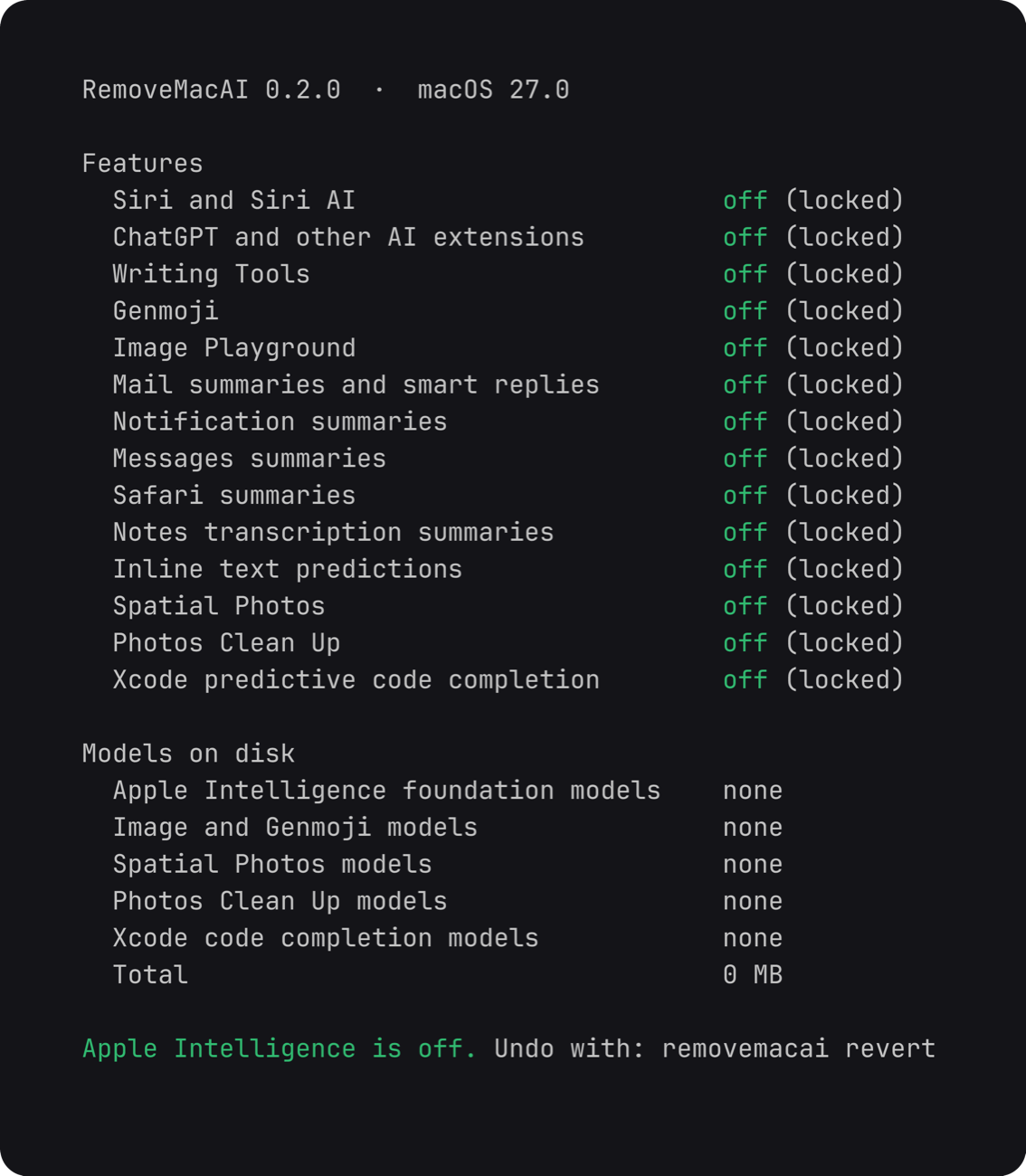 Figure: The detailed feature status output view provided by RemoveMacAI. Source: RemoveMacAI repository (docs/status.png)
The implementation of RemoveMacAI’s core logic didn’t happen without technical precedent. The entire tool is built upon the foundation of the pared project, written by another independent developer, 4evy. The pared team was the first to figure out the working logic of the Unified Asset Framework asset management service through reverse engineering. They consequently mapped out the distribution of large model file collections and the secretive operational mechanics of system-related setup keys.
The Battle for Ultimate Device Control
In terms of interactive design for software engineering, RemoveMacAI offers the standard rigor of a proper toolchain. Its public one-line installation script comes with built-in checksum verification logic, automatically validating the binary integrity of the release package after downloading. The tool doesn’t just offer info-viewing commands like status and features. It also equips the core off action with fine-grained control parameters like --keep, --dry-run, and --yes. Running it without parameters triggers an interactive wizard flow.
A code fix targeting data counting in the project’s commit history inadvertently exposes the unfathomable depths of macOS mechanics. The author submitted a logic fix titled “Stop reporting freed space before macOS deletes the model files”. Prior to that change, the tool would report the freed storage space to the user before the operating system had actually deleted the hard drive files.
The internal UAF asset service in macOS executes deletion actions via asynchronous calls. If the tool calculates disk usage based on conventional file operation logic immediately after issuing the command, the acquired data will only be a false impression of a cleared drive. The state returned by the system’s low-level service API becomes detached from the true state of files on the physical hard drive. This sets an almost insurmountable hurdle for all externally intervening tools.
By executing the removemacai revert command-line instruction, all configuration writes and address modifications can be fully undone. The system can subsequently uninstall this third-party tool normally and cleanly. This uncompromisingly reversible design is a direct response to a closed ecosystem. Apple kept the reversibility of restoring updates in the hands of the system itself. Developers have reclaimed the reversibility of physical deletion back into the hands of the end-user. As large models become the built-in infrastructure of the system, that feature switch in the settings panel is no longer the highest hardware permission the user can control.
References:
- RemoveMacAI GitHub Repository
- 4evy pared GitHub Repository