Even Microsoft Executives Wonder Why It’s Still There
“I don’t even know why we still have phone dialer, which was intended for when people had modems. Passed this feedback on, seems silly to keep carrying it,” Brandon LeBlanc, Senior Program Manager on the Windows Insider Program team, replied to a user on X in November 2026. A 31-year-old legacy utility remains intact inside Microsoft’s latest operating system—and the executive responsible for public communications only discovered it after a user pointed it out.
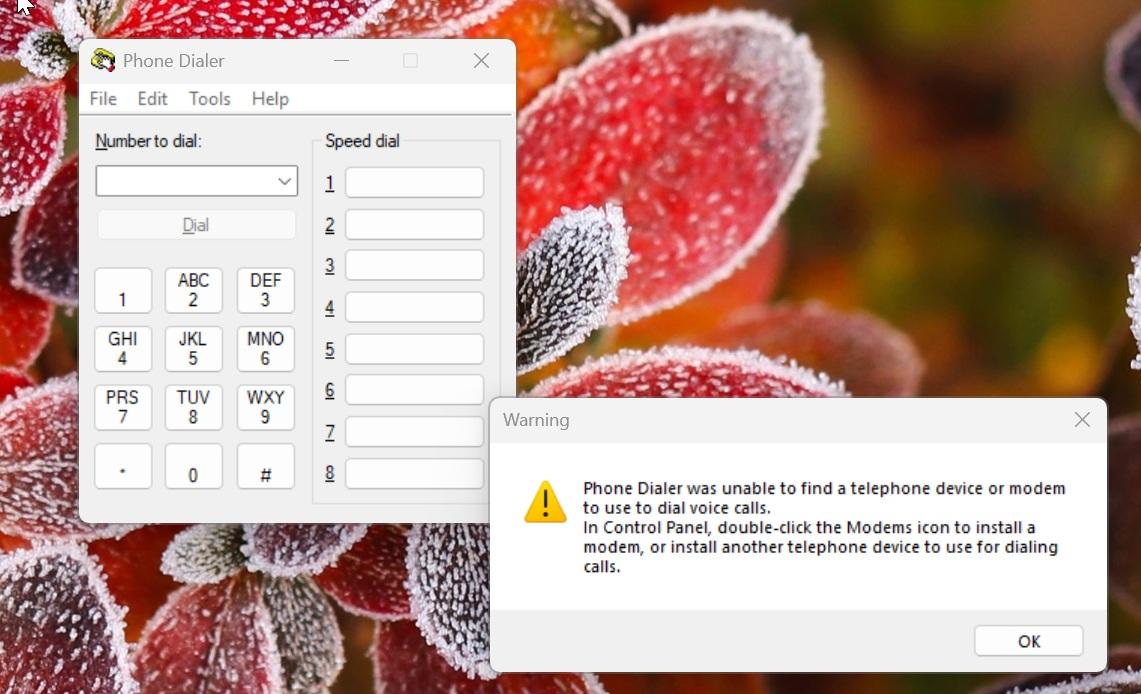
Figure: What actually happens when you type dialer in Windows 11 26H2. Notice the 1990s icon aesthetics paired with modern Windows 11 alert styling underneath—two completely different design eras layered within a single window. Source: Windows Latest
Type dialer, and Out Pops Windows 95
Verifying this costs nothing: open the Run dialog, type dialer, and hit Enter. A dialog box sporting retro icons and a 1990s button layout instantly appears on the Windows 11 26H2 desktop.
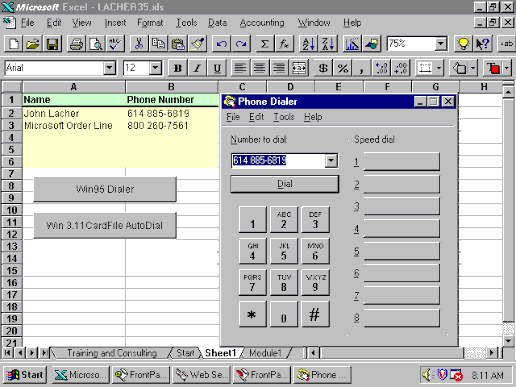
Figure: Phone Dialer on Windows 95. Placing this interface side by side with the previous screenshot reveals that the dialog skeleton has barely changed over three decades. Source: Windows Latest
Its heritage predates even Windows 95, tracing all the way back to Windows 3.1. The warning prompt displayed by Phone Dialer reads: “A phone device or modem could not be found that can be used for voice calls.” That line alone summarizes its predicament: the hardware it was built for vanished decades ago.
More Than One: A Queue of Legacy Dialogs
Phone Dialer isn’t alone inside Windows 11. Back in 2021, Windows Latest highlighted legacy interfaces in dire need of modernization, calling attention to the ODBC Data Source Administrator, which still preserves icons and UI elements from Windows 3.1. Comparing 2021 screenshots with the 26H2 dialog reveals that all Microsoft did across five years was add rounded corners and drop shadows; the UI and UX remain anchored in Windows 3.1.
Nor is this an isolated curiosity. Windows Latest previously compiled a checklist of 25 vintage dialogs and utilities that can still be launched. Device Manager and Disk Management remain entrenched in Windows 11, alongside dozens of legacy components that don’t even resemble Windows 10. Phone Dialer earned public attention simply because of how bizarre it feels, but the broader family of legacy dialogs is far larger than this single app.
Sticky Keys is perhaps the most familiar daily annoyance: pressing Shift five times consecutively triggers a prompt that previously offered no option to permanently disable, repeatedly interrupting gameplay. Microsoft is only now testing a checkbox to suppress future popups, yet the dialog itself remains legacy Win32. Former Microsoft Program Manager Charles Oppermann recalled writing the dialog in 1995 after another executive’s child repeatedly triggered Sticky Keys while playing 3D Pinball: Space Cadet.
When PCs Made Phone Calls
During the late 1990s and early 2000s, many personal computers relied on internal or external dial-up modems connected via standard RJ-11 telephone cords to wall jacks. Users entered a phone number or picked a speed-dial entry in Phone Dialer and clicked Dial. Windows instructed the modem to dial across the telephone line, after which users picked up the physical handset sharing the line to converse.
Internet connectivity ran on a parallel path: Dial-Up Networking instructed modems to dial an ISP access number, establishing data links punctuated by the iconic screeching handshake. While Phone Dialer and Dial-Up Networking shared the same modem hardware, they remained distinct software components. While the latter was long ago superseded by broadband, the former was simply forgotten.
Microsoft Wants to Cut It, but TAPI Says No
Windows Latest readers quickly pointed out a critical detail LeBlanc overlooked: underneath Phone Dialer sits Windows TAPI (Telephony API). Enterprise communications hardware from vendors like Avaya and Auerswald, along with open-source platforms like Asterisk, interface with Windows PCs through TAPI drivers. Once configured with appropriate drivers, numbers dialed via dialer route directly to desktop desk phones—entirely independent of vintage modems.
Windows also incorporates Assisted Telephony, enabling spreadsheets, CRM tools, and line-of-business applications to embed a quick “Dial” button without building native calling stacks from scratch. As long as enterprise telephony infrastructure relies on TAPI integration with Windows, dialer.exe serves as a lightweight, pre-installed testing harness and minimal client.
Vendor Manuals Still Instruct Customers to Use It
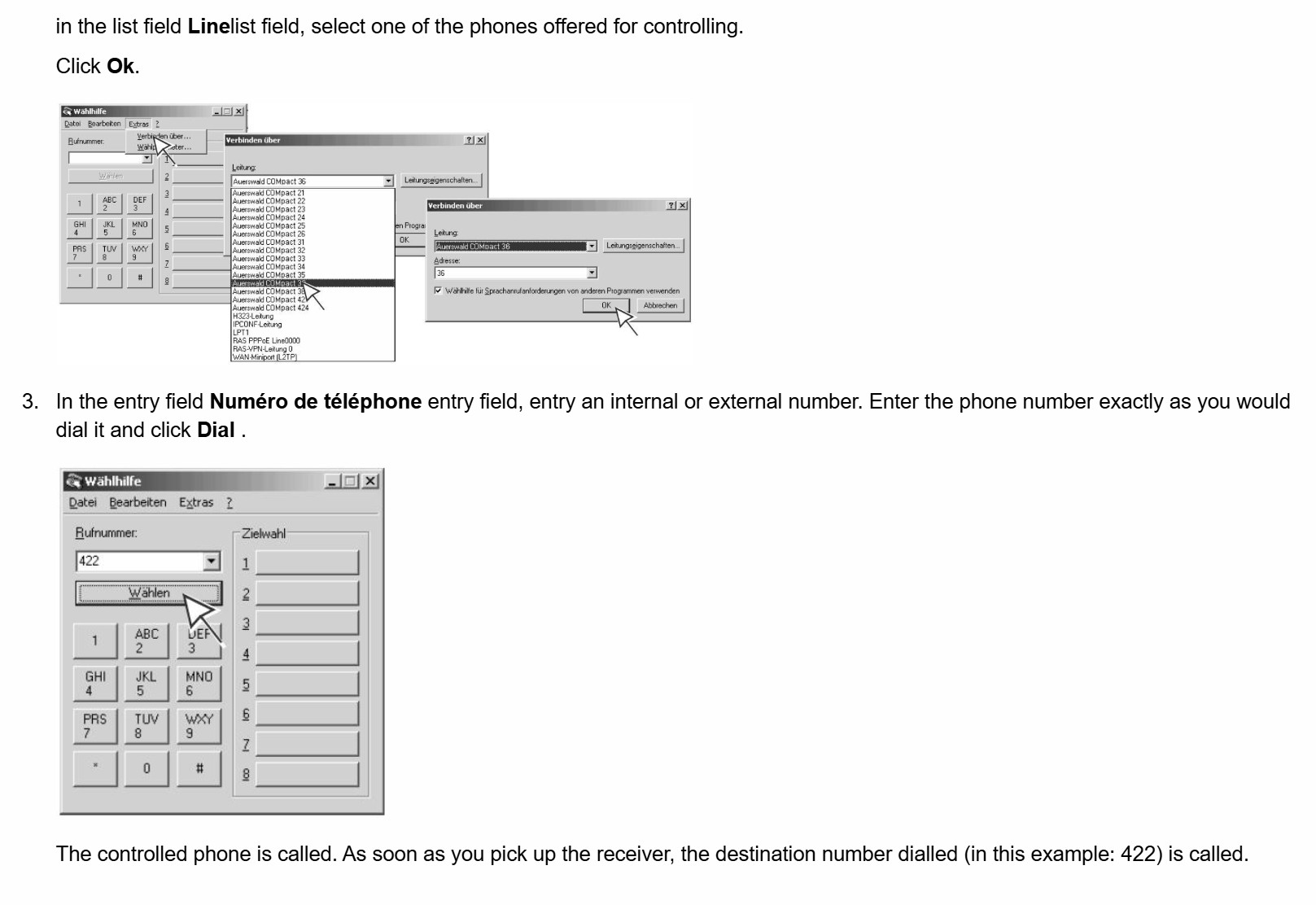
Figure: Operating instructions for dialer.exe in an Auerswald hardware manual. This is an actively maintained equipment guide rather than a historical archive—vendors still teach business customers to use it for desk phone routing. Source: Auerswald (via Windows Latest)
Auerswald hardware documentation outlines the exact workflow: enter a phone number in dialer.exe, click Dial, wait for the desk phone to ring, and pick up the handset to connect. Between German telephony equipment vendors actively updating manuals, enterprise communication heavyweights like Avaya, and open-source PBX installations running Asterisk, a substantial enterprise user base remains quietly attached to this workflow.
If Microsoft wants to deprecate the app, it must answer one prerequisite: what replaces this workflow for legacy PBX environments? LeBlanc’s wording—passing feedback along internally—indicates routing the issue to engineering teams rather than announcing an immediate removal.
Modernization Proceeds, but Dialer Isn’t on the Roadmap
Deprecating legacy utilities is one track, but Microsoft’s active modernization initiative moves along another. The November 2026 update for Windows 11 modernized the AutoPlay dialog, and the December update will introduce an optional WinUI-based Run dialog that removes the vintage “Browse” button. Windows Search and File Explorer properties sheets are also queued for WinUI redesigns, while Print Management recently completed its WinUI 3 transition. Microsoft previously confirmed ongoing efforts to build 100% native applications for Windows.
This roadmap highlights Microsoft’s prioritization logic: dialogs seen daily by everyday consumers receive modern overhauls, while utilities tied to enterprise workflows remain untouched. Windows Latest offered a sensible compromise: while Phone Dialer offers zero value to home PCs, it remains an indispensable bridge for office environments dialing desk phones via TAPI. Updating it with WinUI 3, dark mode support, and basic contacts integration would preserve backward compatibility without harming anyone.
Backward compatibility remains a foundational pillar of the Windows operating system. Even when executives agree a component feels obsolete, as long as enterprise telephone infrastructure remains linked through TAPI, it earns another reprieve. The next Windows 95 relic unearthed by users will likely face the exact same dilemma.
Reference Links:
- Windows Latest: Microsoft Executive Responds to Windows 11 Still Shipping Phone Dialer
- Brandon LeBlanc’s Response on X
- Auerswald Telephony System Documentation