
On August 9, 2026, a test published by Windows Latest put Microsoft in the spotlight: Windows 11’s built-in Weather app was found to consume over 1.2 GB of RAM just to display a weather forecast. On a PC with 8 GB of memory, this single lightweight app takes up nearly a fifth of total system memory. By comparison, macOS’s built-in Weather app uses around 246 MB for the exact same task. Checking the weather should be one of the lightest tasks on a computer, yet Microsoft managed to turn it into one of the heaviest.
The revelation sparked an intense discussion on Hacker News, earning 326 points and 271 comments. Beyond the emotional reactions, there is an architectural reality every user should understand.
It’s Just a Webpage Inside an App Wrapper
Opening Task Manager reveals a long chain of background processes running beneath the Weather app: renderer processes, GPU processes, network processes—all carrying Chromium in their names. This is no coincidence.
The real identity of Microsoft’s Weather app is the MSN Weather webpage. Skipping Windows’ native app frameworks, Microsoft bundled a full browser engine to render the web page. This technology, called WebView2, is essentially Microsoft’s runtime version of Chrome/Chromium. Every time you open such an app, another full browser starts running on your machine.
Benchmark data confirms this behavior: memory usage starts at around 1 GB, idles between 500 MB and 600 MB, and spikes up to 1.5–1.6 GB during scrolling and zooming. To check the forecast, your system has to fire up an entire semi-truck. It carries all the capabilities of a modern browser, along with every bit of overhead a webpage incurs.
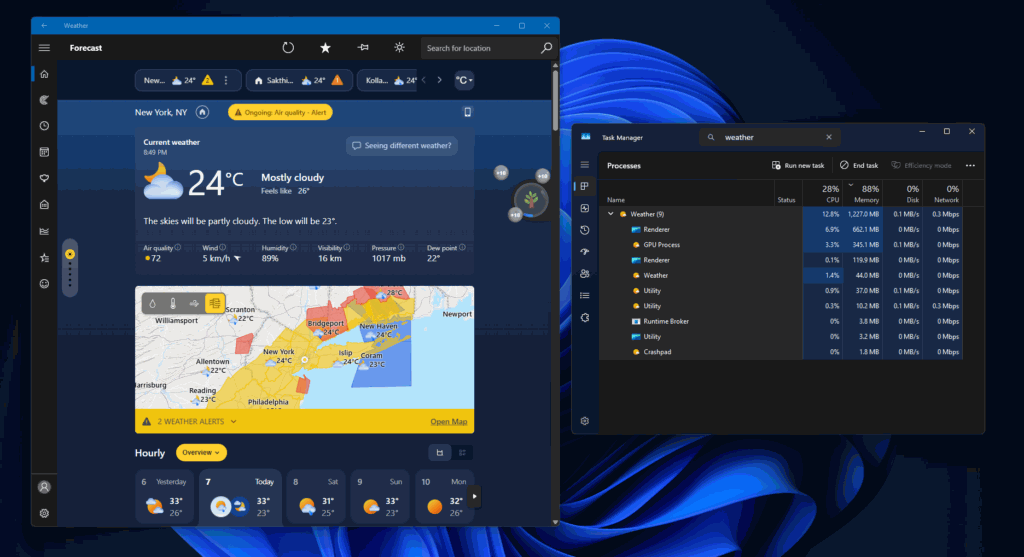 Figure: The Windows 11 Weather app consuming over 1 GB of RAM in Task Manager, backed by multiple Chromium processes. Source: Windows Latest
For the average user, Task Manager is notoriously difficult to decipher. A single app spawns five or six processes with cryptic labels—some named “Microsoft Edge WebView2 Runtime”—making it indistinguishable from a regular browser. Users only notice their PC getting sluggish, without knowing who the culprit is. After troubleshooting, many conclude their hardware is simply outdated and needs replacing. Wrapper architecture turns memory accounting into a murky bill, which is precisely why vendors find it so convenient.
Apple Uses Only 246 MB: Where Is the Gap?
The macOS Weather app is written natively and loads resources on demand. Community members analyzed its memory bill: roughly 45 MB allocated to dynamic background animations, 44 MB to system frameworks, 21 MB to graphics rendering, and only 6.3 MB to the actual weather data service. Every megabyte serves a clear, traceable purpose.
Others drew broader comparisons: the entire KDE desktop environment, complete with wallpapers and multiple desktop widgets on a 5K display, consumes around 560 MB. While Apple has its own commercial motivations, it kept the resource footprint under control for this app. 246 MB isn’t aggressively frugal, but it is responsible engineering. Native apps pay per feature on demand, while wrapped web apps demand full upfront payment. A 5x RAM disparity is an architectural choice, not an efficiency issue.
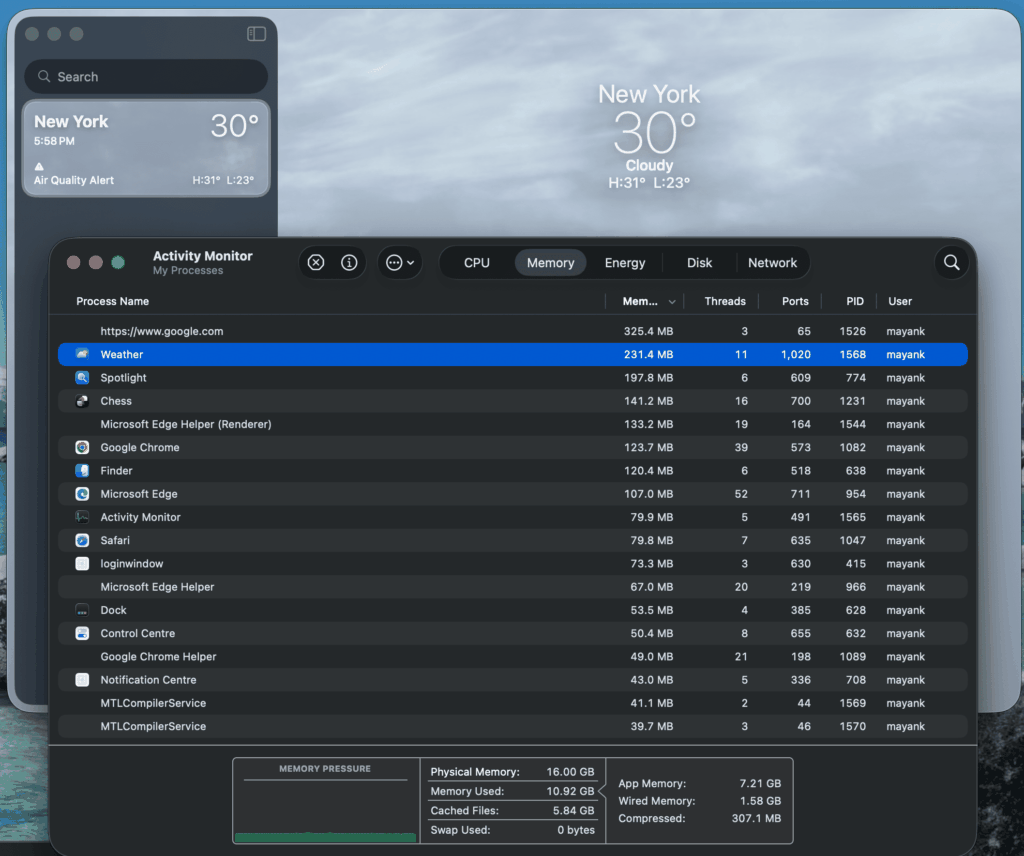 Figure: macOS built-in Weather app consuming under 250 MB of memory. Source: Windows Latest
How Much Padding Is in That 1.2 GB Figure?
The headline number has drawn some debate. Counterarguments on Hacker News noted that if Microsoft Edge or Google Chrome is already running in the background, shared memory structures reduce the actual incremental memory impact below 1.2 GB. Task Manager displays the working set total, without distinguishing between unique and shared memory allocations.
Conversely, real-world testing demonstrated that closing the Weather app immediately frees up hundreds of megabytes of RAM. The 662 MB renderer process shown in screenshots was spawned specifically by the Weather app, rendering the shared memory argument less persuasive.
Both perspectives hold partial truth. The 1.2 GB figure represents total working set footprint; net memory cost varies depending on how many browser processes are active. However, even if that figure is cut in half, a weather app consuming 500 MB remains absurd. The core controversy isn’t the exact megabytes, but why a basic utility requires a browser engine in the first place.
The True Reason for Browser Wrappers: Advertising
Using web wrappers offers an undeniable commercial advantage: write once, deploy across Windows, web, and mobile. By maintaining a single web application, Microsoft’s MSN team can push weather, news, and stock updates straight into the OS. The memory cost is offloaded entirely to the user.
A more pragmatic reason is advertising. Embedded inside the Weather app is an MSN content feed, featuring sponsored articles designed to look identical to weather cards. In an operating system paid for by the customer, built-in system applications still deliver ads. The desktop widget board contains the exact same ad-heavy feed.
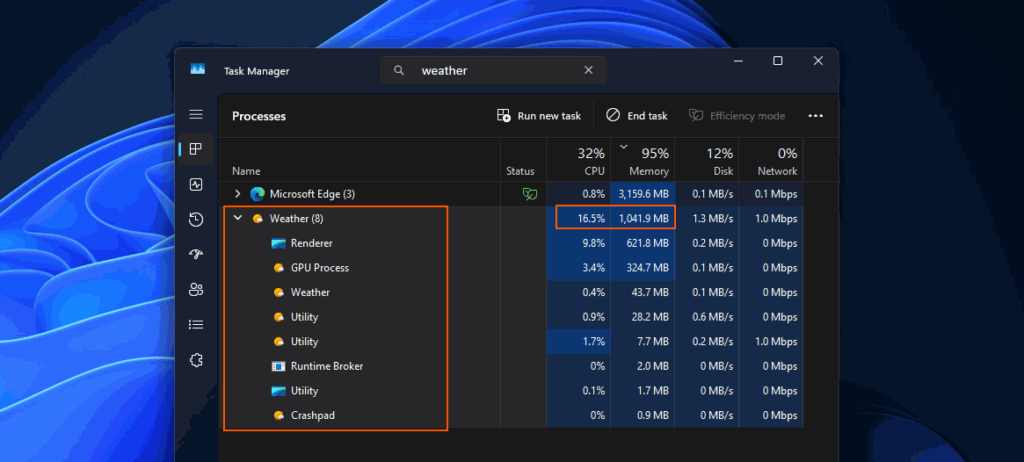 Figure: Windows 11 Weather app is essentially a web page wrapped inside an app container. Source: Windows Latest
Hacker News discussions pointed to a deeper concern: Chrome and Edge are tightening restrictions on ad-blocking extensions under Manifest V3, making tools like uBlock Origin increasingly constrained. Under the new rules, extensions face strict caps on request filtering rules, severely limiting their effectiveness. The community widely views this as clearing a path for advertising. While restricting users’ ability to block ads, Microsoft embeds ads inside native UI. Between ad revenue and user experience, vendors have made their choice. The memory footprint of the Weather app is merely a symptom.
What Users Can Do: A 130 MB Workaround
A top-voted comment on Hacker News shared a simple workaround that requires no technical expertise. In Microsoft Edge, install the uBlock Origin extension, visit the MSN Weather website, click the “Install site as an app” button in the address bar to create a PWA desktop shortcut, and unpin the built-in Weather app.
The resulting app interface is identical, but memory usage drops from 1.2 GB down to around 130 MB, while ads are completely blocked. The mechanics are straightforward: it runs inside your already active Edge process with shared browser binaries, while the extension blocks ad scripts. 130 MB versus 1.2 GB represents nearly a tenfold reduction.
The remaining uncertainty is time: Chromium browser engines continue to roll out extension restrictions, giving uBlock Origin’s full manifest version a limited shelf-life on Chromium-based browsers. Some community members recommend switching to Firefox. How long this workaround remains viable depends entirely on browser vendors’ policies.
The Memory Bill Is Always Footed by the User
Technology stack selection is ultimately a business decision, but the hardware bill is paid by the user. Microsoft promises optimizations for low-spec 8 GB PCs while allowing its own Weather app to claim nearly a fifth of total RAM while serving ads. Executive promises of returning to native apps remain without a clear timeline for MSN-backed utilities.
Next time you open Task Manager and see a confusing stack of memory-heavy processes, don’t rush to blame your hardware. Ask instead: is this just another browser in disguise? The answer lies right inside that process list—it just takes a bit of patience to spot it.
Reference Links:
- Notebookcheck: Windows 11’s built-in Weather app wastes more than 1 GB of RAM
- Hacker News: Windows 11’s built-in Weather app wastes more than 1 GB of RAM (item?id=49232138)
- Windows Latest: Windows 11’s Weather app uses 5x the RAM of macOS Weather, because Microsoft has forgotten how to make native apps
- Microsoft Learn: Use Progressive Web Apps in Microsoft Edge