
On September 24, 2026, Microsoft rolled out a deceptively quiet update to the Insider Beta channel: support for multiple values inside a single cell. For four decades, the spreadsheet universe operated under an unwritten, cast-iron law: one cell, one value. Now, the creators of the medium have officially dismantled it.
Stop Stuffing Three Names into a Plain Text String
Over the past forty years, virtually every business analyst and project manager using Excel has wrestled with the same structural limitation. When an initiative has three owners, four workstreams, and five milestones, a flat two-dimensional grid simply cannot accommodate that hierarchy. Real-world business data is inherently relational and multi-tiered; forcing it into rows and columns has always been an awkward compromise. In practice, operators resorted to concatenation—packing “Carlos, Henrietta, Jacob” into a comma-delimited text string—or created sprawling webs of redundant helper columns.
The immediate fallout was the complete collapse of native filtering and aggregation. If you wanted to isolate projects involving “Jacob”, Excel’s traditional autofilter treated the entire cell as an atomic string. The filter dropdown would explode into hundreds of permutation checkboxes, rendering basic lookup workflows impossible. Collapsing nested data into plain text created an analytical dead end.
With the new update, pressing Ctrl+J or choosing Insert > List promotes delimited values into first-class business entities within the cell. The era of matching entire text strings is over: the filter dropdown can now target individual owners independently while preserving the row’s underlying context. Real data was always multi-valued; forcing users to flatten it was a historical artifact left behind by early spreadsheet engines.
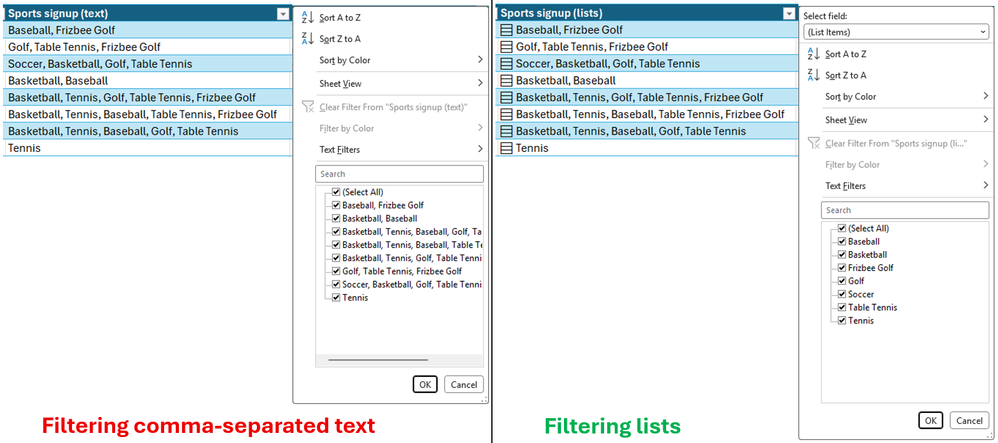 Figure: Comma-separated text causing cluttered whole-string filters (left) vs. native multi-value lists enabling clean individual item selection (right). Source: Microsoft Excel Official Blog
Formula Spills, Caged: Wrapping Arrays in Braces
Multi-value cells are more than an interactive UI list. Under the hood, Microsoft introduced a new runtime mechanism: “arrays in cells”. Excel veterans remember when array formulas required arcane Ctrl+Shift+Enter keystrokes. When dynamic arrays debuted in 2018, formula results began spilling outward automatically across adjacent rows and columns. While dynamic arrays unlocked immense computational power, they frequently wrecked bespoke report layouts, threw #SPILL! errors, or overwrote neighboring data.
Microsoft has now introduced a way to put the spill behavior back into a cage. By wrapping the formula body in curly braces { }, the entire spilled array stays neatly confined to a single cell. A dedicated expansion icon appears on the right edge of the cell, allowing users to inspect the underlying array on demand. Analysts no longer need to allocate wide swaths of blank worksheet space just to buffer intermediate calculations, dramatically boosting report density.
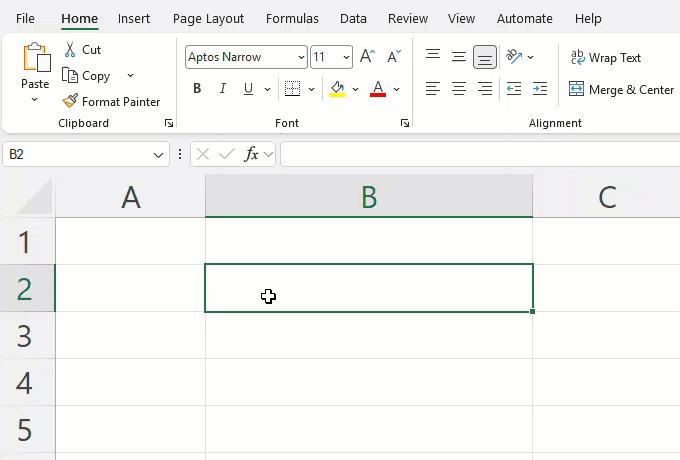 Figure: An expansion icon appears on the right edge of the cell, keeping multi-value calculations from spilling across neighboring cells. Source: Microsoft Excel Official Blog
Nested arrays further allow spreadsheets to mirror actual tree structures. In a website launch tracker, design, development, and QA workstreams can each maintain their own sets of milestone dates under the same parent record. The multidimensional logic remains intact, sparing analysts from having to denormalize raw data into thousands of granular rows only to reconstruct the hierarchy later with pivot tables.
A New Function Ecosystem for Set Logic
The debut of multi-value cells has necessitated an entirely new vocabulary of set-oriented functions. Once a cell holds a collection of values, basic equality checks (=) no longer suffice. Microsoft has rolled out dedicated tooling for set operations, targeted at high-friction office workflows like project tracking, survey analysis, and compliance certification.
The HAS function tests whether a specific item or owner exists inside a cell. HASANY identifies records associated with any member of a designated group, such as an executive leadership team. HASALL enforces strict completeness—verifying that every required stakeholder has signed off before a milestone advances. Paired with FLATTEN, which unrolls deeply nested array hierarchies into a clean linear list, Excel formulas finally mirror the mental models of business users.
Breaking a 40-Year Contract: The Downstream Reckoning
On the surface, this update represents an overdue modernization of Excel’s engine. Beneath the surface, however, it destabilizes forty years of foundational assumptions across the data industry. Ever since VisiCalc and Lotus 1-2-3 defined the medium, the entire data-processing software stack was constructed around the tacit promise of scalar cells. Countless corporate financial models, pivot caches, VBA macros, and COM add-ins assume that dereferencing a cell yields a single, primitive type. This four-decade technical inertia was the last line of defense keeping enterprise data pipelines intact.
While Microsoft’s first-party ecosystem will adapt smoothly, Excel is seldom the final destination—it is usually the messy ingestion point of the corporate data pipeline. When workbooks containing arrays in cells are exported to standard formats and ingested by SQL loaders, legacy ETL scripts, or Python pandas pipelines, the abstraction boundary shatters. Ingestion routines written under the assumption of scalar floats or strings will suddenly encounter complex nested objects or ambiguous serialized lists. Vectorized operations will fail, and automated type inference engines will throw catastrophic errors.
Smashing the single-value paradigm provides undeniable layout convenience on the front end. But this backward-incompatibility time bomb is now planted across hundreds of millions of historical workbooks and tens of millions of data scripts.
Permitting multiple values in a single cell is a pragmatic concession to the messy nature of real-world business data. It concedes that the physical world was never meant to fit neatly into a flat two-dimensional grid. Banishing single-value constraints eliminates redundant rows and makes formula authoring intuitive again. But cramming multidimensional data into primitive grid coordinates may ultimately multiply the fragility of the data pipelines that power the modern economy.
Reference Links:
- Microsoft Excel Official Blog
- Microsoft 365 Insider Blog
- Hacker News Discussion