
On November 19, 2026, Dutch engineer Therry van Neerven published real-world benchmark data showing how he compressed 5.7GB of active RAM data into just 1.7GB of physical space using the Linux kernel’s native zram module. That instantly recovered 70% of physical memory capacity on the spot—with virtually zero perceptible latency during everyday tasks.
Whenever a desktop stutters or a server alert fires off for memory exhaustion, the instinctive reaction for most people is to buy extra RAM sticks or upgrade to a pricier cloud instance tier. Yet in an era where multi-core processor performance is drastically overprovisioned, throwing cash at hardware is rarely the most elegant engineering solution. Modern operating system kernels have long possessed the capability to trade a fraction of spare compute power for multiples of usable memory.
Spawning Hundreds of Tabs: Squeezing 5.7GB into 1.7GB
To stress-test memory compression under real-world pressure, the author devised an extreme scenario. The test machine packed 32GB of RAM, leaving around 28GB of usable physical memory after dedicating a slice to the integrated graphics card.
He authored an automated script designed to blast open hundreds of browser tabs in quick succession—spanning news portals, technical communities, source code repositories, streaming media, and e-commerce storefronts.
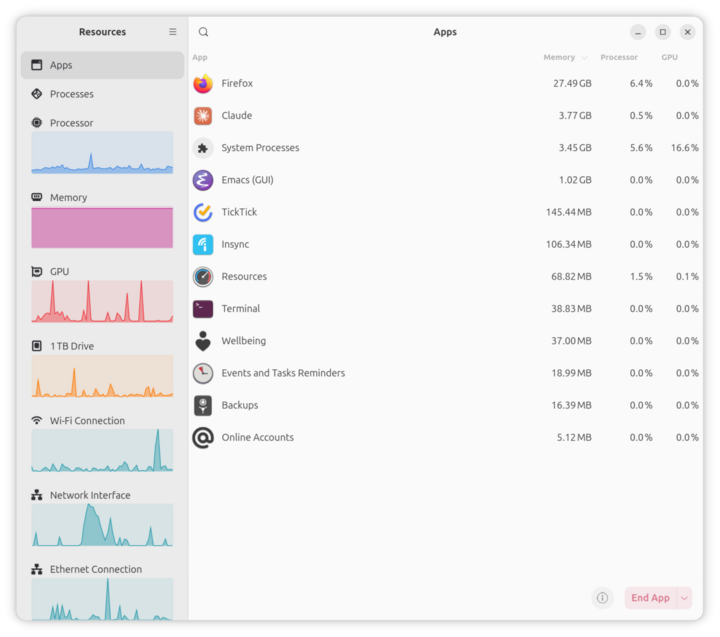 Figure: Aggregate per-application memory demand outstrips physical memory capacity. Source: curiousbits.nl
On an unoptimized system, an onslaught like this instantly chokes physical RAM. Modern web pages are laden with hefty JavaScript bundles and high-resolution assets; leaving just a few dozen open can easily devour several gigabytes.
When aggregate demand breaches the physical memory threshold, conventional systems typically react in one of two catastrophic ways: they either aggressively thrash against disk swap, freezing the entire desktop environment into an unresponsive lockup, or the kernel Out-Of-Memory (OOM) killer steps in, mercilessly terminating foreground applications.
This time, the system stayed rock solid. Terminal monitoring confirmed that Linux automatically carved out a virtual swap device managed by zram in physical memory. Inactive, idle pages sitting in background tabs were transparently funneled into this compressed staging area.
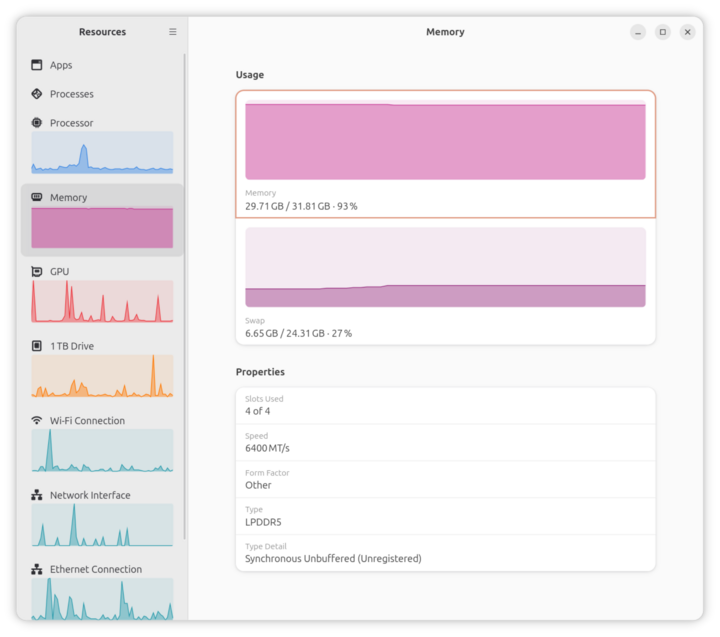 Figure: Overview of system memory usage, with idle application data swapped into compressed memory. Source: curiousbits.nl
Querying runtime statistics via zramctl, the author observed that 5.7GB of uncompressed memory data had entered the compression pipeline, ultimately consuming a mere 1.7GB of actual physical RAM.
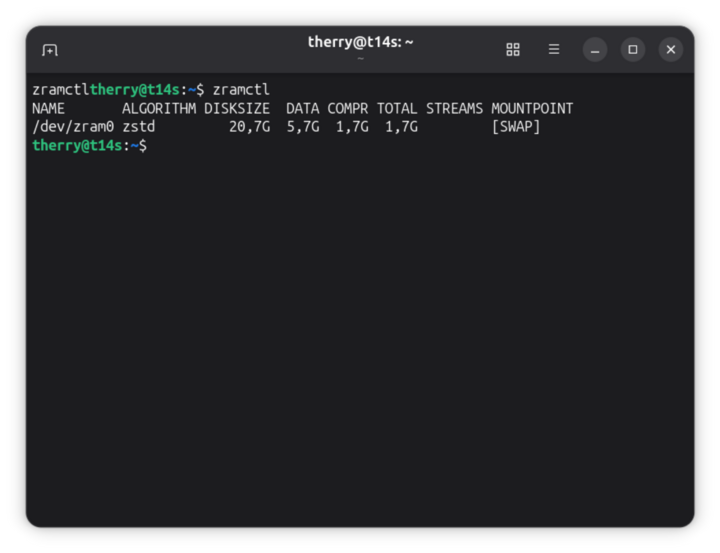 Figure: Terminal output from the zramctl utility, showing 5.7GB of memory data compressed down to 1.7GB. Source: curiousbits.nl
This represents an effective compression ratio of 1:3.35. In scenarios dominated by plain text, structured JSON, or compiled code pages, compression ratios frequently hit 1:4. Workloads that would normally consume 4GB of RAM fit snugly into just 1GB of physical space. Throughout the stress test, CPU overhead increased only marginally in the background, while application switching remained smooth and responsive.
Enabled Everywhere by Default, Yet Ubuntu Leaves It Disabled
In-memory compression is an industry-proven architectural pattern that has powered consumer electronics silently for over a decade.
Windows users who open Task Manager can routinely spot a “Compressed” memory metric. Apple introduced kernel memory compression all the way back in macOS Mavericks (2013). Smartphones operate under rigid thermal, physical space, and bill-of-materials constraints; consequently, Android has long relied on zram swap as a core baseline standard. The ability of modern mobile devices to juggle dozens of heavy apps in the background without constant reloading hinges entirely on this invisible compression scheduling.
The desktop Linux ecosystem has notable pioneers as well. Fedora and Pop!_OS both enable zram out of the box in their default installation images. The snappy, lightweight feel of these distributions on low-memory laptops is largely owed to this single default configuration.
Puzzlingly, Ubuntu—which commands a massive share of desktop and server deployments—still leaves zram disabled by default. AWS Amazon Linux only turns it on for select burstable micro instances. The vast majority of general-purpose Linux installations simply let this powerful kernel feature sit completely dormant.
A faction of Linux system maintainers has long adhered to an old-school division of labor: server CPU cycles belong exclusively to application workloads, while memory shortages should be settled by adding physical silicon. But on modern multi-core chips, idle compute capacity is abundant. Clinging to outdated defaults merely offloads hardware costs onto end users and site reliability engineers.
Trading Idle Compute for RAM: Time to Revisit the Latency Math
To appreciate why memory compression is so effective, one must evaluate the latency hierarchy of modern hardware storage tiers.
The traditional remedy for memory exhaustion is swapping to disk. A CPU can access main system RAM in mere tens of nanoseconds. Solid-state drive (SSD) random read latency sits in the tens of microseconds, while rotational hard drives lag behind in milliseconds. As soon as a kernel begins paging heavily to disk, latency explodes by orders of magnitude—bringing desktop responsiveness to an immediate crawl.
zram operates fundamentally differently. It carves out a virtual block device right inside physical RAM. Any page routed into this swap block is passed through a high-throughput compression algorithm before storage. When an application needs that background page again, the CPU catches the request and decompresses it instantaneously.
Throughout this entire roundtrip, data never leaves the high-speed memory bus. Modern algorithms like lzo-rle or zstd achieve gigabytes-per-second throughput across multi-core CPUs. A modern processor can decompress a 4KB memory page in a few microseconds—orders of magnitude faster than retrieving an uncompressed block from NVMe storage.
On typical desktop and cloud server environments, CPU utilization routinely hovers below 10% during routine duties. Sacrificing a sliver of that idle headroom to double or triple effective memory capacity offers an exceptionally favorable engineering return on investment.
Cutting Cloud Bills with One Command: Free Instance Upgrades
The financial payoff of in-memory compression is felt most directly on monthly cloud hosting invoices. By putting idle CPU headroom to work, cloud infrastructure bills can plummet.
Reflecting on his past engineering career, Therry van Neerven recalled maintaining a monolithic SaaS application. Every time the team deployed new feature modules, baseline resident memory creeped upward. The infrastructure team repeatedly scaled their cloud instances from 8GB to 16GB, and eventually to 32GB tiers.
These tier upgrades directly inflated recurring operational expenses. Yet when reviewing telemetry dashboards, CPU utilization barely twitched, idling at modest percentages around the clock. Had the team enabled zram compression back then, they could have shaved off at least half of the thousands of dollars spent monthly on memory-driven instance upsells.
In technical discussions on Hacker News, cloud engineers widely agreed on a core dynamic: entry and mid-tier cloud pricing models are almost universally anchored to RAM quotas. Jumping from 2 vCPU / 4GB to 2 vCPU / 8GB routinely doubles the subscription bill.
Enabling zram in production yields an immediate return. An entry-level server instance originally rated for 4GB workloads can effortlessly absorb spikes up to 8GB. For small and medium-sized engineering teams, that amounts to a completely free hardware tier upgrade without paying another dime to cloud providers.
Three Lines of Configuration to Unlock 2x More Usable Space
Reclaiming this trapped capacity requires virtually zero friction. Core Linux distributions have shipped native kernel support for years.
The Arch Linux Wiki provides exhaustive documentation detailing the configuration parameters for kernel zram devices. On Debian and Ubuntu systems, setup takes literally one command: installing the zram-tools package is all it takes to initialize the underlying module.
Administrators simply specify the maximum memory quota allocated to zram in /etc/default/zramswap and pick a fast compression algorithm. The system daemon takes care of activating the compressed block device upon every subsequent boot. There is no need to crack open a desktop case to seat new RAM DIMMs, nor any need to click expensive upgrade toggles in cloud provider dashboards.
Hardware vendors and hyperscale cloud providers naturally benefit from selling hardware upgrades whenever resources run tight. But modern operating system kernels were engineered precisely to manage tradeoffs between compute, storage, and latency.
A simple, battle-tested configuration already sitting inside your kernel can restore two-thirds of your usable memory. When memory runs low, the first thing to loosen shouldn’t be your wallet—exhaust the free engineering levers already built into your system first.
References:
- Curious Bits Blog: “Do not buy RAM, compress!”
- Hacker News Technical Discussion Thread
- Arch Linux Wiki: Zram Entry