Make a copy of an empty Notepad executable, rename it to codex.exe, and double-click to launch it. Within seconds, background services in Windows 11 flag your session, determining that you are actively using the AI coding assistant Codex.
The entire process performs no validation of binary code, nor does it inspect actual execution. The background system does not care whether the program crashes immediately. It is interested in one thing only: which competing tools are running on the user’s desktop.
Reverse Engineering Reveals 9 Preset Slots: Who Windows Is Watching
A security researcher reverse-engineered system components in Windows 11. Inside a core dynamic link library named MissionControlAggregator.dll—a modular functional library required for system operation—he uncovered an explicit preset checklist. The list prominently features copilot.exe, claude.exe, codex.exe, and cursor.exe.
Within the component’s codebase, dedicated telemetry slots are carved out for two distinct categories of developer tools. One group targets command-line programming tools with 4 reserved slots. The other monitors desktop window applications across 5 reserved slots. Combined, these 9 slots comprehensively cover the leading AI coding assistants on the market today.
The tracking table also encompasses a variety of conventional developer utilities. For Microsoft’s proprietary developer environments, the operating system verifies digital signatures and publisher credentials. But for open-source compilers and third-party AI assistants, the code does not even inspect publisher metadata.
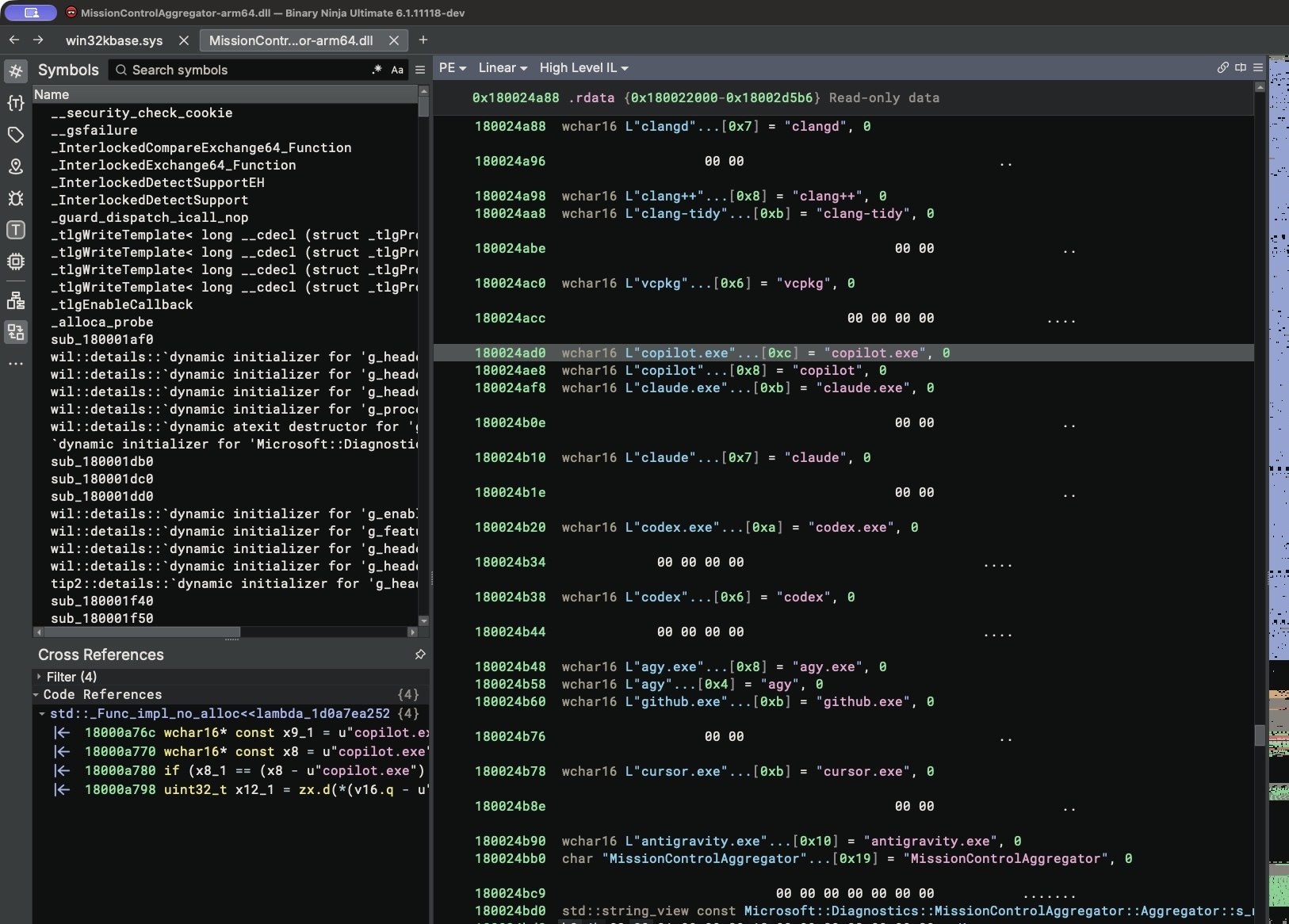 Figure: String list parsed from MissionControlAggregator.dll in the Binary Ninja disassembler, showing executable filenames of major AI coding assistants. Source: xusheng.dev
To control this instrumentation, the low-level operating system includes a dedicated feature flag. Named CLICodingAgentUsage and designated by feature ID 62580080, this latent mechanism was already activated by default on the test machines.
File Names Are All It Takes: The System Ignores Runtime Crashes
Conventional wisdom assumes system monitoring requires aggressive background daemons constantly scanning local storage drives. This component does not poll the active process table at all. Instead, it subscribes directly to Windows kernel event channels.
Whenever a new process launches or shifts window focus, the low-level kernel event subsystem broadcasts a notification. This mechanism is known as Event Tracing for Windows (ETW), an internal system-wide event bus. The background aggregator continuously listens for these ETW events, comparing incoming process image names against its hardcoded roster.
To verify the mechanism, the researcher conducted a controlled experiment. He duplicated cmd.exe (the built-in Command Prompt), renamed it to codex.exe, and ran it. Windows had no awareness of the substitution. The operating system immediately toggled the corresponding telemetry bit in memory and committed the updated status value to a local database on disk. Even if the program is merely a dummy binary bearing a matching name, the system marks you as an active user of that AI tool.
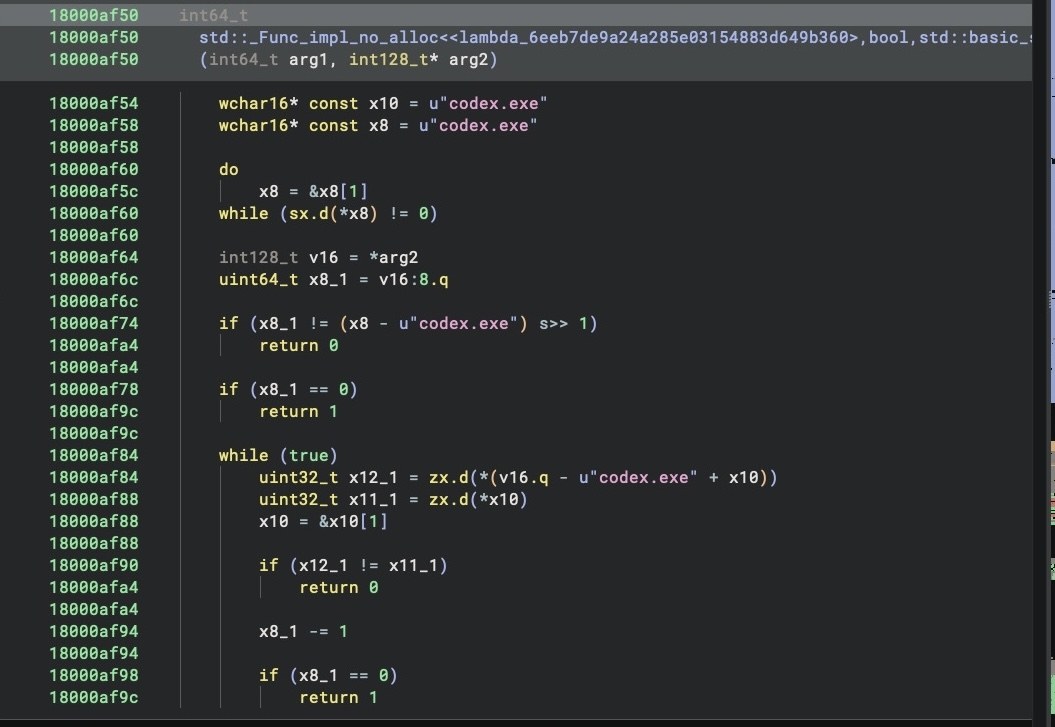 Figure: Decompiled string matching logic within the component checking for specific filenames like codex.exe. Source: xusheng.dev
In an accompanying test, the executable was renamed to gcc.exe. The system registered usage in the conventional tool slots just as swiftly. Checking strictly by filename while discarding executable verification completely decouples this behavior from genuine technical debugging.
One Bit per Day: Diagnostic Telemetry Maps the Competition
Operating systems collect operational telemetry primarily to identify and troubleshoot technical failures. Windows kernel event broadcasts typically bundle detailed runtime metrics, capturing foreground active duration, user keystroke counts, and hardware resource utilization.
The aggregator component, however, discards all of these diagnostic metrics. It retains only a compact bitmap recording whether a user has launched specific third-party applications.
The telemetry logic processes records through an internal function named ReportCohorts<12,4,5>. In this implementation, 12 corresponds to general development utilities, 4 tracks command-line AI tools, and 5 covers desktop AI software. Every monitored tool occupies exactly one bit in the payload, using a binary 0 or 1 to denote whether it has been executed.
Stripping away performance parameters to leave behind an application checklist makes the intent transparent. The primary objective is mapping market penetration across competing software ecosystems. Approximately once every 24 hours, the system bundles this locally recorded bitmap and uploads it to Microsoft servers.
Opted In by Default: Telemetry Consented During Clean Installs
Under Microsoft’s privacy classifications, this telemetry stream is designated as “optional diagnostic data.” By definition, optional data is supposed to require explicit user opt-in before collection begins.
During clean installation testing, the researcher observed a different reality. Performing a fresh install with the latest official Windows 11 ISO image while leaving default privacy options untouched resulted in the diagnostic toggle defaulting to “Send optional diagnostic data.”
The background service responsible for bundling and transmitting this telemetry is DiagTrack (the Connected User Experiences and Telemetry service). The service host spawns the aggregator module, after which events flagged with AI tool usage join the outgoing transmission queue. Packet captures confirmed that although the event payload carries an optional diagnostic tag, it was already staged for upload.
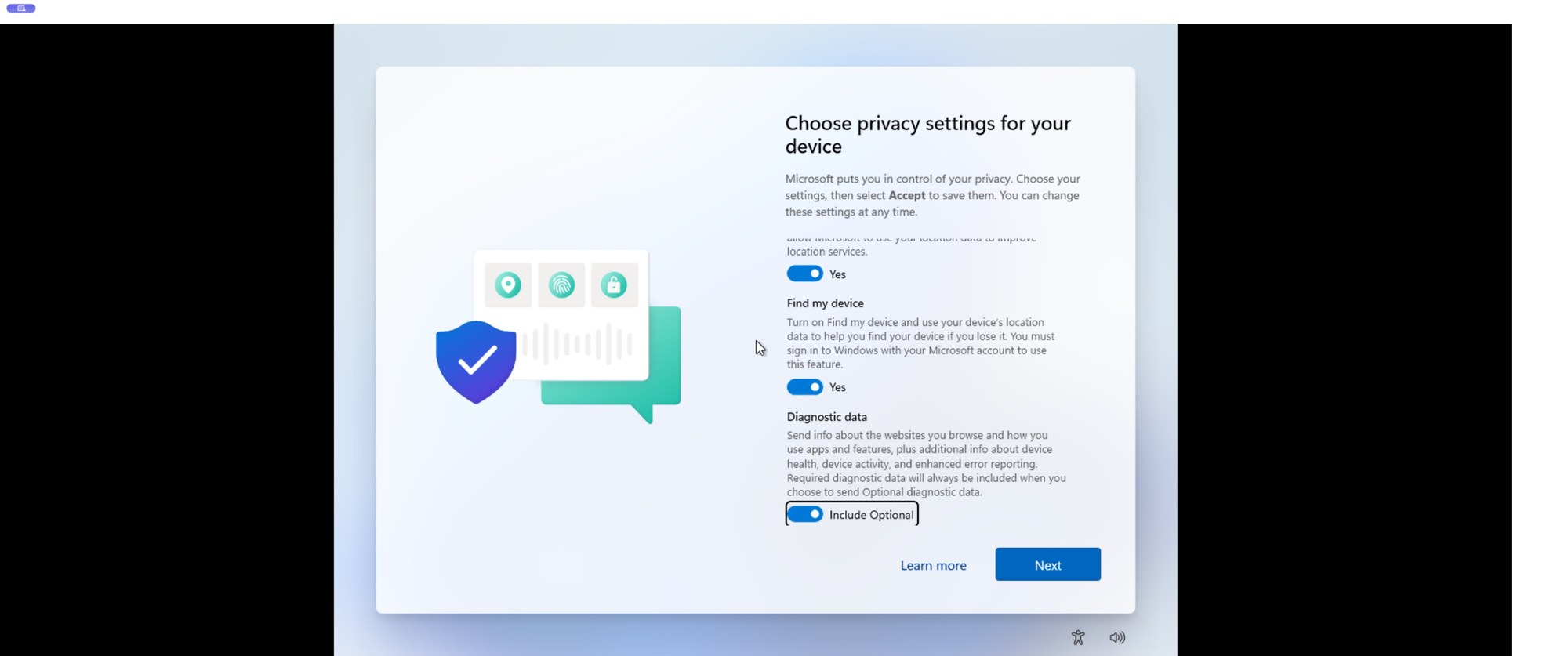 Figure: Out-of-box experience setup screen during a clean Windows 11 installation, showing optional diagnostic data pre-selected. Source: xusheng.dev
These reverse-engineering findings were verified in a specific testing environment using an ARM-based preview build of Windows 11. Regional privacy frameworks create variations; for example, the European Union enforces stricter standards under GDPR, meaning users in other jurisdictions should verify their local defaults. Importantly, the analysis confirmed that Windows does not inspect source code, project files, or prompt text. The monitoring is strictly confined to which developer tools are being executed.
From System Troubleshooting to Competitive Intelligence: How to Opt Out
From an operating system developer’s perspective, understanding application distribution can have valid engineering merit. Tracking ecosystem trends aids in hardware resource scheduling and planning software compatibility layers.
However, when the platform vendor actively competes in the application layer, this data collection creates an undeniable conflict of interest. Microsoft’s Copilot directly competes against third-party AI coding solutions. Leveraging privileged operating system access to monitor competitor usage is the operational equivalent of a tollway operator logging every rival delivery vehicle on its roads.
The mechanism to disable this telemetry channel remains straightforward. When performing a fresh OS installation, users should explicitly uncheck optional diagnostic telemetry during the initial setup wizard.
On existing installations, the feature can be toggled off by navigating to Settings → Privacy & security → Diagnostics & feedback. Disabling optional telemetry effectively halts the operating system’s silent inventory of desktop developer tooling.
An operating system derives its authority from platform neutrality. When built-in diagnostic systems are repurposed to inventory competing software, they steadily erode user trust in the underlying platform.
Reference Links:
- xusheng.dev Reverse Engineering Analysis
- Microsoft Windows Diagnostic Data & Privacy Documentation
- Hacker News Technical Discussion