Run the exact same 3.3-billion-row database under heavy concurrent random writes, switch the underlying storage from cloud network volumes to local chassis disks, and throughput immediately jumps by 9.24x.
Whenever production databases slow down, engineering teams instinctively look for slow queries, add indexes, or provision more RAM. At POSETTE, the 2026 Postgres community conference, engineers broke down where transaction time actually goes. Out of 36.9 milliseconds of total latency, the CPU spent just 2 milliseconds performing computations. For the remaining 35 milliseconds, the system sat idle waiting for the disk to deliver data across the wire.
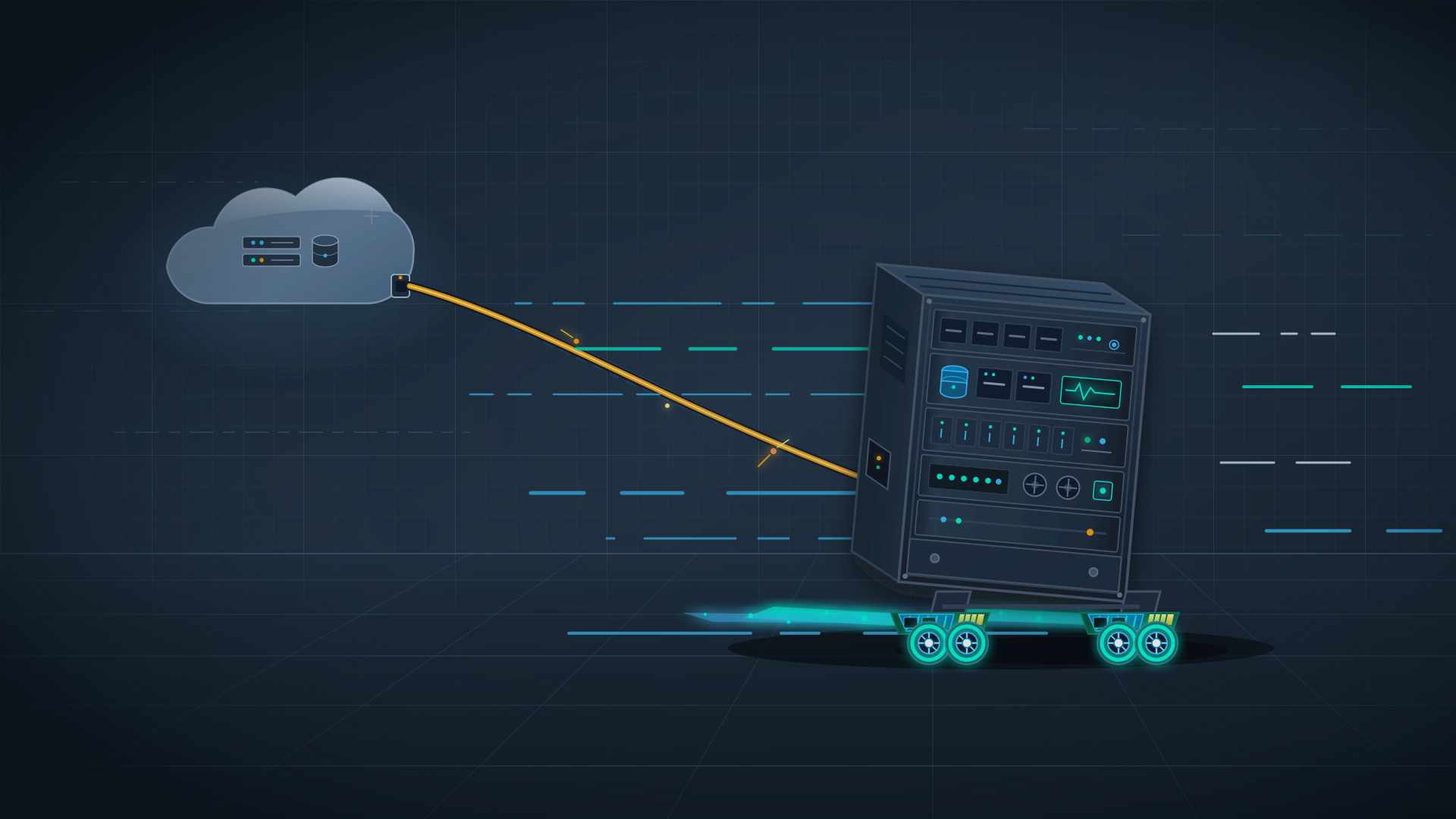
The bottleneck slowing down the database was never CPU capacity. The culprit was a network-attached cloud volume sitting racks away across Ethernet cables.
Inside 37ms of Latency: Computation Takes Just 2ms
As dataset sizes swell, production databases frequently develop a familiar syndrome of concurrency ailments: write latency slips from seconds into minutes; read latencies jump from milliseconds to full seconds; autovacuum cannot keep pace with table bloat; checkpoint writes starve user transactions; and replication pipelines fall hopelessly behind.
To isolate the root cause, the ClickHouse team deployed eight identically configured database clusters on AWS m6id.4xlarge instances. Each host featured 16 vCPUs, 64 GB of memory, and 16 GB of PostgreSQL shared_buffers. The only variable was the storage layer: four clusters mounted baseline AWS gp3 EBS volumes provisioned at 3,000 IOPS, while the other four ran directly on host-local NVMe SSDs.
The benchmark workload targeted a massive 3.3-billion-row table weighing 482 GB. Sixty-four client connections and 16 worker threads hammered the database with intensive random updates over five minutes. The local NVMe clusters clocked 16,030 transactions per second, while the EBS clusters managed only 1,734 TPS. Median latency dropped from 36.9 ms to 4.0 ms—a throughput gap of 9.24x.
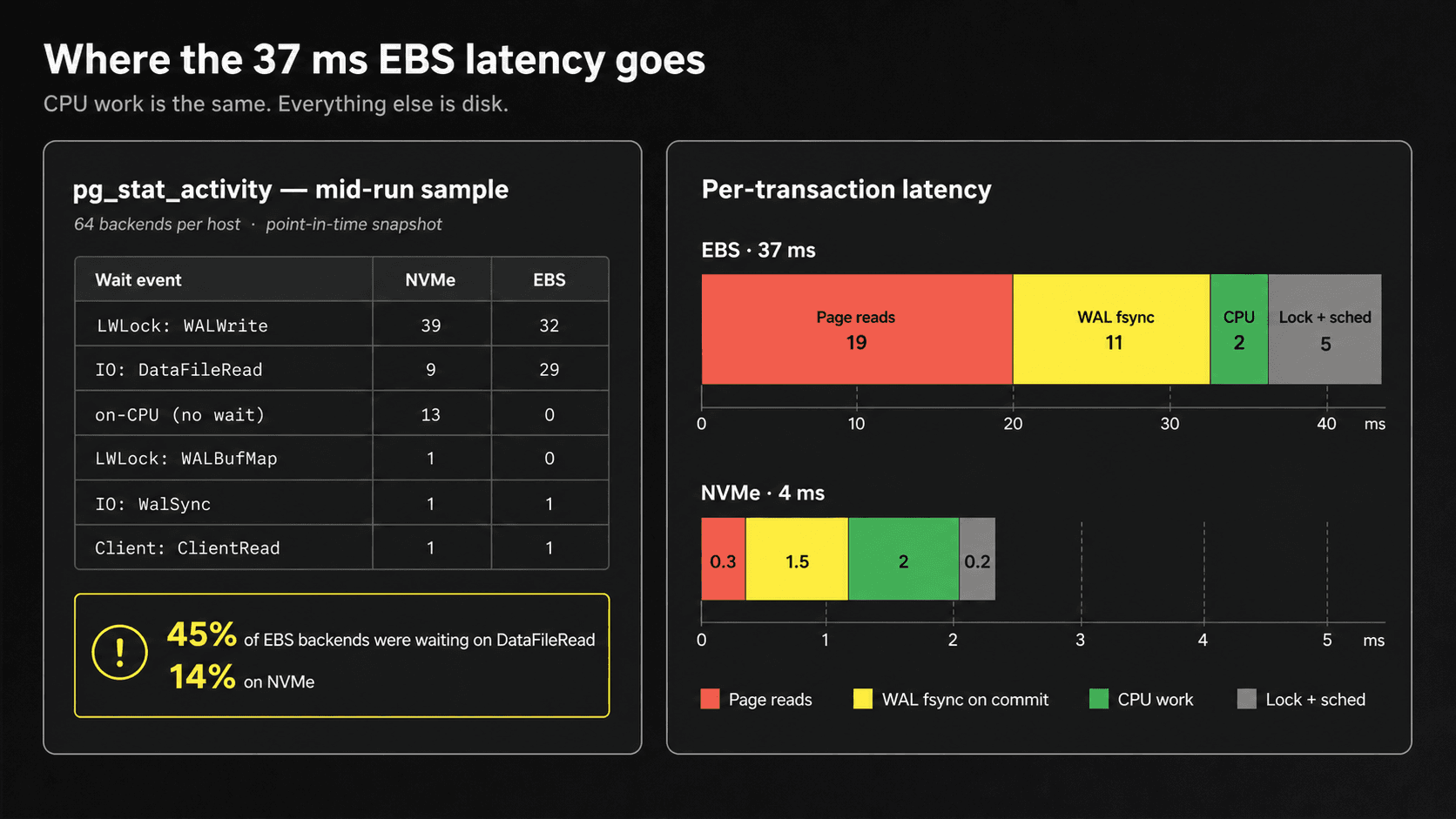 Figure: Transaction latency breakdown between EBS and NVMe. Notice the drastic gap in page read and WAL fsync times, while CPU compute time remains virtually identical. Source: ClickHouse (POSETTE 2026 talk recap)
The latency breakdown reveals the physical reality behind the numbers. On EBS, an individual page read took roughly 19 ms, compared to 0.3 ms on local NVMe. Writing the write-ahead log (WAL fsync) took 11 ms versus 1.5 ms. Lock contention and scheduling overhead accounted for 5 ms versus 0.2 ms. Yet actual computation time was identical across both setups at around 2 ms. The extra 35 ms of latency had nothing to do with query complexity; the process spent the vast majority of its lifecycle waiting on remote storage acknowledgments.
Cloud Disks Across the Wire: Throughput Plummets by 9x
It is easy to treat cloud volumes as standard local drives. In modern cloud architecture, however, Elastic Block Store is an independent storage cluster running in separate racks. Every read and write must traverse virtual switches, fiber links, and remote storage controllers.
Local NVMe SSDs, by contrast, sit directly on the motherboard’s PCIe bus, inches from the CPU. When concurrent writes blow past the memory buffer, every disk seek tests the limits of I/O latency. Millisecond-level network hops get multiplied across thousands of random reads and writes, compounding into massive delays.
The performance gap becomes just as glaring during routine background maintenance. Vacuuming 10 GB of table bloat took 366 seconds on local NVMe versus 964 seconds on EBS. Draining a 10 GB logical replication backlog took 139 seconds on local drives compared to 238 seconds on cloud volumes. When maintenance tasks cannot outpace garbage generation, table bloat spirals out of control and consumes ever more resources.
This benchmark tested baseline gp3 volumes provisioned at 3,000 IOPS. Paying extra for provisioned IOPS and throughput narrows the gap, but no amount of money can shrink cross-network round-trip latency down to the speed of a motherboard PCIe bus.
Idle CPUs: 90% Compute Capacity Lost to I/O Wait
Process profiling during the benchmark captured a stark divergence. On the EBS instance, 29 out of 64 worker processes were stalled in I/O wait during data reads—nearly 45% of all active workers. On local NVMe, only 9 processes were waiting on disk reads, or roughly 14%.
CPU profiling across both hosts revealed an even deeper structural divide. Over a 240-second monitoring window, the local NVMe host accumulated 2,253 CPU seconds—keeping roughly 9.4 cores fully engaged. The EBS host recorded only 251 CPU seconds, averaging just one active core across the entire test.
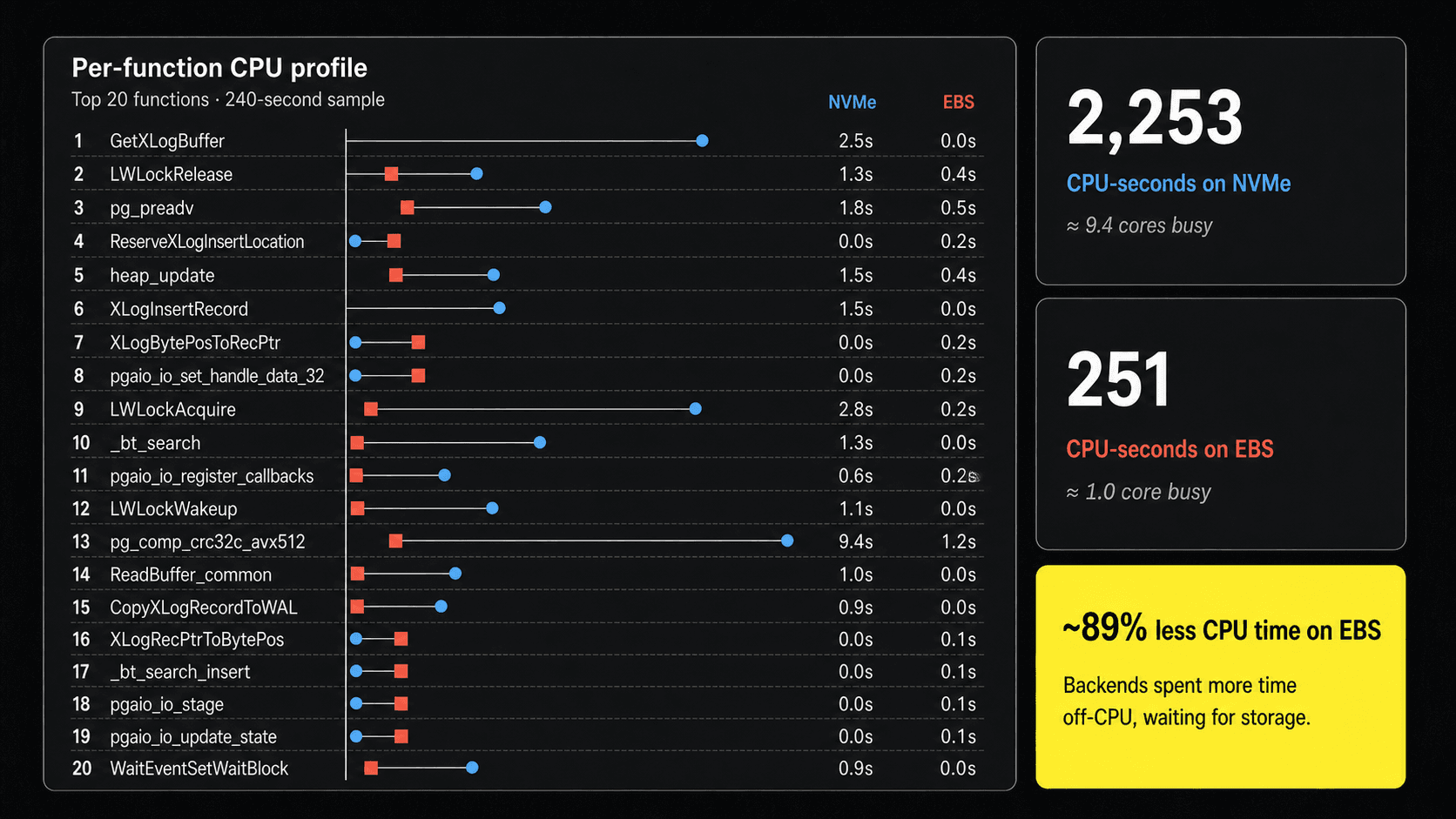 Figure: CPU consumption comparison across both hosts. The NVMe host clocked 2,253 CPU seconds, while the EBS host logged only 251 CPU seconds, spending the vast majority of time blocked on storage responses. Source: ClickHouse (POSETTE 2026 talk recap)
Worker processes on EBS spent almost their entire lifetime suspended, waiting for remote data packets to arrive over the wire. Nine-tenths of the CPU’s compute capacity sat completely idle. The team paid in full for a 16-core machine, but only put a single core to work.
This highlights a common trap in systems monitoring: low CPU utilization often looks like an underutilized, comfortable system. In reality, the database is starved for data, bottlenecked by remote storage lines.
Moving to Local Disks: You Must Own Disaster Recovery
As compelling as the speed gains are, deploying local disks in production is not without trade-offs. Ephemeral instance-store volumes are tied directly to the physical server lifecycle. If the underlying host suffers a hardware failure or is stopped, data on local disks is permanently lost.
EBS may be slower, but cloud providers bundle multi-replica redundancy and instant snapshots out of the box. If a VM fails, the EBS volume can be detached and reattached to a fresh instance within minutes. Moving to local NVMe means the operations team must take full responsibility for high availability and disaster recovery. The performance leap is real, but so is the operational burden.
Running production databases on local NVMe requires three solid lines of defense:
- Synchronous Cross-AZ Replication: Deploy two standby replicas using a quorum configuration such as
ANY 1 (standby1, standby2). Transactions commit as soon as either standby acknowledges the WAL write, balancing low latency with disaster tolerance. - Continuous Archival and Point-in-Time Recovery: Use tools like WAL-G to stream base backups and WAL segments continuously to object storage. This compresses Recovery Point Objectives (RPO) down to seconds and enables point-in-time recovery.
- Rigorous Capacity Planning: Local disk capacity is bound to instance hardware specs and cannot be resized on the fly with a single slider. Teams must forecast growth accurately and leave ample headroom.
High performance demands keeping data as close to the CPU as possible; high reliability demands storing backups as far from the host as possible. Reconciling these two opposing engineering requirements must be handled in system architecture.
Cutting the Network Layer: Recalculating Performance vs Ops
The ClickHouse benchmark ignited an active debate across the engineering community. Some practitioners raised skepticism, noting that ClickHouse is an analytical database vendor and might benefit from shifting attention toward storage bottlenecks.
However, frontline database engineers shared corroborating experiences. Teams migrating Postgres workloads to instances with local NVMe reported average I/O latency dropping from 1.0 ms to 0.1 ms, leading to massive speedups in reporting queries. Others noted that while networked block storage was a sensible bargain in the spinning-disk era, in the NVMe era the network abstraction layer incurs an order-of-magnitude throughput penalty.
In real-world operations, cloud snapshots are often tied to instance lifecycles. Accidental instance deletions can wipe unmanaged snapshots as well. Many engineering teams already maintain independent backup pipelines regardless. Delegating reliability entirely to cloud providers often turns out to be only partial outsourcing.
When a database crawls, the culprit is often the network cable strung between server racks. Switching to local NVMe unlocks the raw throughput hardware is capable of delivering. But there is no free lunch: if you take the speed, you must shoulder the burden of disaster recovery yourself.
Reference Links:
- ClickHouse Technical Blog (POSETTE 2026 Talk Recap)
- POSETTE 2026 Talk: “Postgres Isn’t Slow. Your Storage Is.”
- Hacker News Community Discussion